Inside My Home Network: UniFi, WireGuard, Pi-hole, Tailscale, and a Mixed-Arch Kubernetes Fleet
Why I run a home lab
Day to day I do site reliability and cloud platform engineering for a living — VLANs, service meshes, and Kubernetes are already the vocabulary of my job. At home I run a smaller version of the same ideas, partly for convenience (ad-blocked DNS everywhere, one login for every device) and partly because it’s the cheapest lab I have for trying things I’d never risk on production: a new CNI setting, a WireGuard config, an ARM node joining an amd64 cluster.
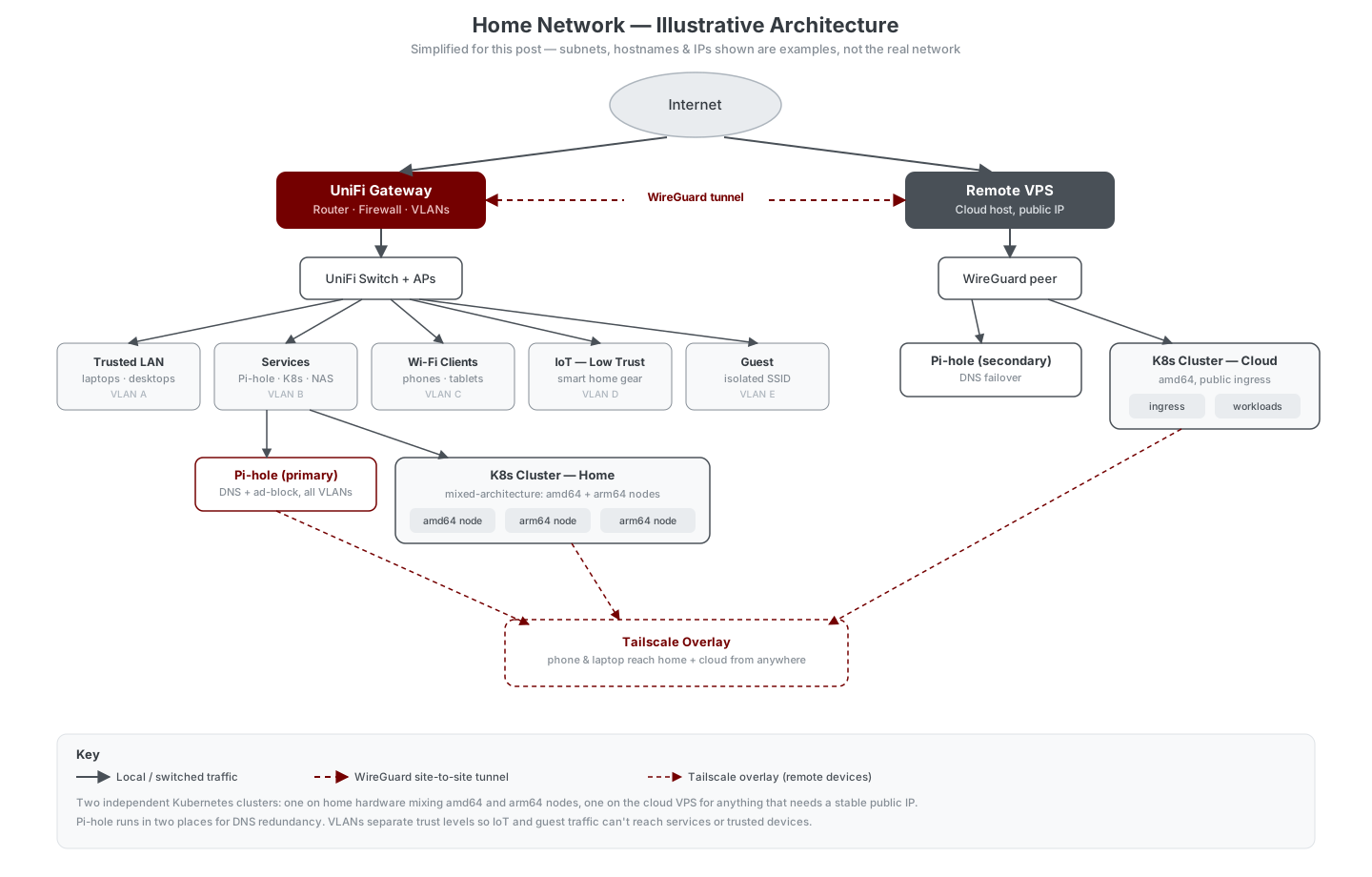
The diagram below is illustrative, not a leak of my actual addressing — I redrew it with example subnets so I could talk through the shape of the network without publishing real internal IPs.
UniFi and VLAN segmentation
The network runs on UniFi gear end to end — gateway, switches, and access points all managed from one controller. The main thing that buys me is easy VLAN segmentation without touching a dozen different vendor UIs. Traffic gets split roughly like this:
- Trusted LAN — my own laptops and desktops, full access to everything.
- Services — the boxes running Pi-hole, Kubernetes, and other always-on infrastructure.
- Wi-Fi clients — phones and tablets, day-to-day devices.
- IoT — low trust — smart plugs, speakers, and anything else I don’t fully trust on the network. It can reach the internet and nothing else.
- Guest — its own SSID, fully isolated from the rest.
The point of splitting things this way isn’t paranoia so much as blast radius. A compromised smart bulb on the IoT VLAN has no path to the machine running my Kubernetes control plane, because the firewall rules between VLANs say so, not because I’m hoping it stays that way.
Pi-hole, twice
DNS-based ad-blocking is one of those upgrades that’s hard to go back from once every device on the network benefits from it automatically. I run Pi-hole as the DNS resolver for every VLAN — but a single Pi-hole is also a single point of failure for name resolution on the whole network, which is a bad trade for something this cheap to avoid. So there are two instances: a primary at home and a secondary reachable over the WireGuard tunnel, each configured as the other’s fallback resolver. If one goes down for an upgrade or a reboot, DNS just keeps working.
WireGuard: the tunnel between “home” and “away”
I rent a small VPS mainly so I have a box with a stable public IP and no residential ISP quirks in front of it. A WireGuard tunnel connects that VPS back to the UniFi gateway at home, so the two sites behave like one network for routing purposes — the secondary Pi-hole and the cloud Kubernetes cluster are reachable from home, and select home services are reachable from the VPS, all over an encrypted point-to-point link instead of anything exposed directly to the internet.
WireGuard earns its keep here specifically because it’s boring: small config, kernel-level performance, and nothing to manage beyond a couple of key pairs and an allowed-IPs list.
Tailscale: remote access for people, not sites
WireGuard handles the site-to-site link; Tailscale handles me. It’s the overlay my phone and laptop join when I’m away from home, giving them a route back into both the home network and the VPS without opening ports or maintaining a manual peer config on every device. It’s built on WireGuard under the hood, but the NAT traversal and device management it adds on top are exactly the parts I don’t want to hand-roll for something that just needs to work reliably from an airport Wi-Fi network.
The short version of the split: WireGuard connects two networks I control; Tailscale connects the devices in my pocket to those networks, wherever I am.
Two Kubernetes clusters, one of them mixed-architecture
I run two separate Kubernetes clusters rather than one big one, and they exist for different reasons:
- Home cluster — mixes amd64 and arm64 nodes: a repurposed x86 server alongside a couple of ARM single-board machines. This is where most of my personal projects live — a URL shortener, a couple of small internal tools, and hobbyist services like ADS-B flight-tracking feeders that are happiest running close to the antenna hardware feeding them data. Mixing architectures means being deliberate about multi-arch container images and using node affinity/taints so a workload built for one architecture doesn’t get scheduled onto the other — small annoyance, but it also means idle ARM boards stop being idle.
- Cloud cluster — a single-architecture (amd64) cluster on the VPS, used for anything that needs a stable public IP and ingress from the open internet, fronted by a reverse proxy and TLS termination rather than exposed directly.
Splitting them keeps the blast radius of a home power outage or ISP hiccup away from anything that needs to stay reachable from the outside world, and it gives me a second, differently-shaped cluster to test things against — which matters more than it sounds like when the day job is making sure clusters behave predictably under change.
What actually made this worth building
None of this is exotic — it’s the same primitives most SRE and platform teams reach for, just scoped down to a few racks’ worth of hardware instead of a fleet. The value has been less about any single piece and more about the discipline of running it: segmented trust boundaries, redundant DNS, an encrypted path between “home” and “everywhere else,” and a couple of Kubernetes clusters small enough that breaking one is a Tuesday-evening inconvenience instead of an incident. That’s a good trade for a home lab, and honestly not a bad way to stay sharp on the same concepts I use professionally.